2018年6月12日 星期二

MT4 Bookmark Login

https://blog.csdn.net/MT4Develop/article/details/78464175

https://www.2cto.com/kf/201711/696119.html

https://blog.csdn.net/MT4Develop/article/details/51925398


基于MT4平台实现二元交易的思路

市面上有很多基于MT4做的二元交易。 
这里只简单说下我做的思路。 
主要要处理两个方面的事,一个是在客户端对二元信息的 展示,另一个是在服务端处理二元信息的交互以及对下单逻辑的处理。
1.客户端 
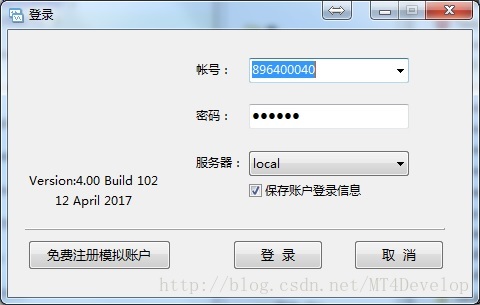
客户端可以自己做一个程序,做个登录界面, 
这里写图片描述 
然后去 服务端验证用户名以及密码,验证成功后,加载MT4本身的客户端程序,使其自动登录,并附加(SetWindowsHookEx)一个自己写的dll文件到该进程上。 
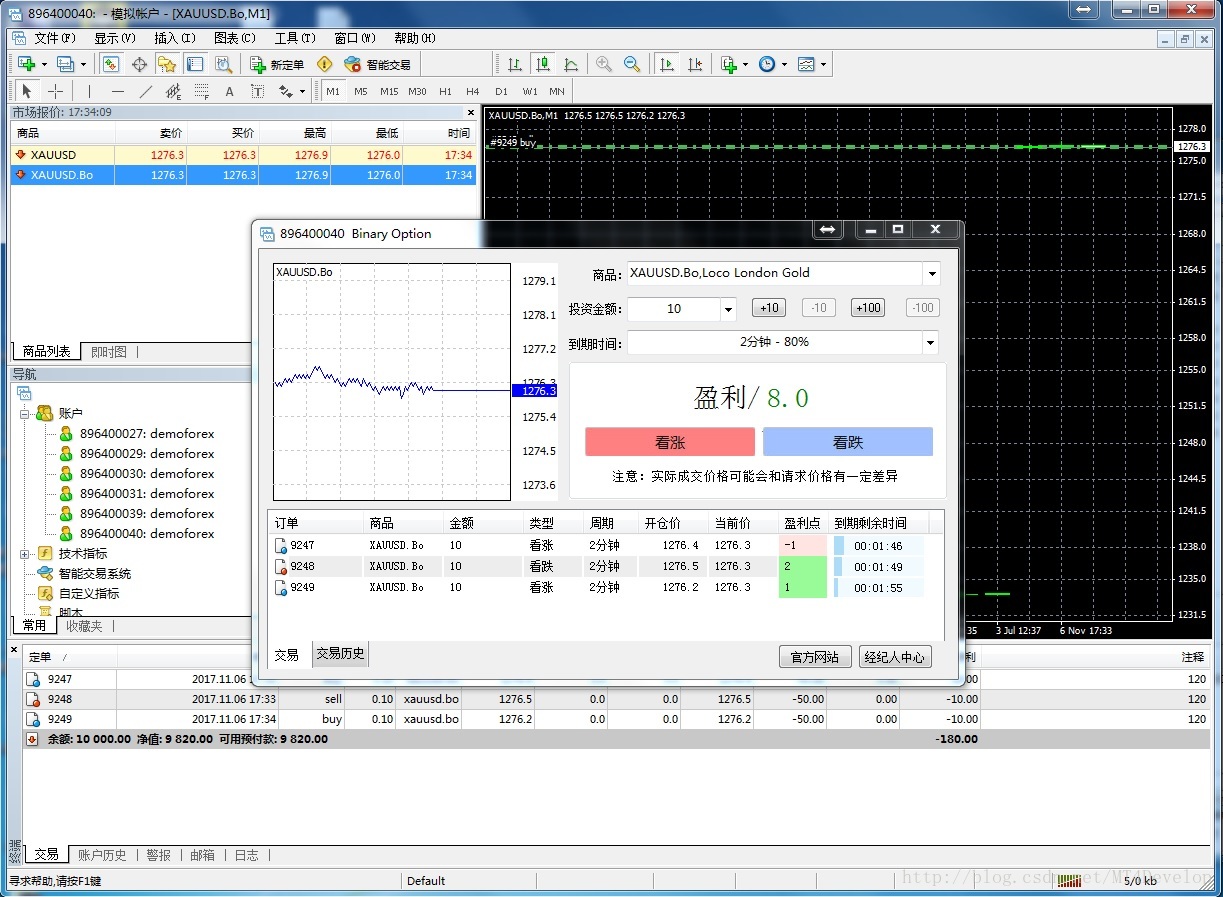
附加dll是 为了拦截一些MT4界面上的消息,当点击二元商品时,弹出一个自己的窗口界面(如下图)并关闭MT4本身的下单界面,在这个界面中进行二元的操作与信息展示 
这里写图片描述
对于二元的下单以及信息获取,这里可以自己维护通讯,直接与服务端通讯,不需要与 MT4客户端发生任何关系。
2.服务端 
服务端主要要处理 这么几个事,首先是客户端的一些数据请求的回应,例如验证用户帐号,获取二元的持仓,二元的下单等。 
这里可以利用MT4插件的扩展事件 
int APIENTRY MtSrvTelnet(const ULONG ip, char *buf, const int maxlen) 
来做,MT4会将收到的数据转发到插件的这个事件中,事件处理后,会将数据返回给客户端。
由于二元业务是根据时间对单据进行结算,所以需要在插件中启动一个 线程,时刻检查单据的情况,在插件的启动事件
int APIENTRY   MtSrvStartup(CServerInterface *server)  
  • 1
启动一个线程即可,在线程里对持仓单据持续检查,发现时间到了的就进行平仓操作,并计算相关的盈亏更新到单据中。 
另外要注意启动的线程要在插件停止事件中关闭
void APIENTRY  MtSrvCleanup(void)
  • 1
,否则可能会造成MT4服务端启时崩溃。


___


如何使用MT4平台实现二元交易

市面上有很多基于MT4做的二元交易。
这里只简单说下我做的思路。
主要要处理两个方面的事,一个是在客户端对二元信息的 展示,另一个是在服务端处理二元信息的交互以及对下单逻辑的处理。
1.客户端
客户端可以自己做一个程序,做个登录界面,
这里写图片描述
然后去 服务端验证用户名以及密码,验证成功后,加载MT4本身的客户端程序,使其自动登录,并附加(SetWindowsHookEx)一个自己写的dll文件到该进程上。
附加dll是 为了拦截一些MT4界面上的消息,当点击二元商品时,弹出一个自己的窗口界面(如下图)并关闭MT4本身的下单界面,在这个界面中进行二元的操作与信息展示
这里写图片描述
对于二元的下单以及信息获取,这里可以自己维护通讯,直接与服务端通讯,不需要与 MT4客户端发生任何关系。
2.服务端
服务端主要要处理 这么几个事,首先是客户端的一些数据请求的回应,例如验证用户帐号,获取二元的持仓,二元的下单等。
这里可以利用MT4插件的扩展事件
int APIENTRY MtSrvTelnet(const ULONG ip, char *buf, const int maxlen)
来做,MT4会将收到的数据转发到插件的这个事件中,事件处理后,会将数据返回给客户端。
由于二元业务是根据时间对单据进行结算,所以需要在插件中启动一个 线程,时刻检查单据的情况,在插件的启动事件
?
1
<code>int APIENTRY   MtSrvStartup(CServerInterface *server)  </code>
启动一个线程即可,在线程里对持仓单据持续检查,发现时间到了的就进行平仓操作,并计算相关的盈亏更新到单据中。
另外要注意启动的线程要在插件停止事件中关闭
?
1
<code>void APIENTRY  MtSrvCleanup(void)</code>
,否则可能会造成MT4服务端启时崩溃。


___

MT4服务端插件案例

需求描述

客户本来有一个交易系统,要求mt4与该系统交互,做到与该系统数据同步。 
以下是客户的需求原文。
MT4只作为一个桌面版的交易工具,和WebTrader共用一个账号体系,MT4的所有功能最终都通过Web API连接券商系统的后台实现。MT4终端需要实现以下功能: 
●登录 
用户可以在MT4终端登录券商系统,登录后可以进行查询、下单、平仓等操作,MT4终端需要正确保存用户的登录状态,超时后需要重新登录。 
●查询账号保证金 
用户可以在MT4终端查询自己交易账号的保证金情况 
●查询持仓 
用户可以在MT4终端查询到自己交易账号的持仓情况 
●查询挂单 
用户可以在MT4终端查询到自己交易账号委托的LIMIT和STOP类型订单 
●查询交易记录 
用户可以在MT4终端查询到自己交易账号的历史交易记录 
●下单 
用户可以在MT4终端下单,订单抛给通过券商系统执行,成交后通过查询持仓和保证金更新用户的账号信息 
●撤单 
用户可以在MT4终端撤销自己委托的LIMIT和STOP类型的订单 
●平仓 
用户可以在MT4终端对交易账号中持仓的订单进行平仓,平仓成功后通过查询持仓和保证金更新用户的账号信息 
●设置止损 
用户可以在MT4终端对持仓中的订单设置或修改止损价位 
●设置止盈 
用户可以在MT4终端对持仓中的订单设置或修改止盈价位

实现细节

本文中将原有系统WebTrade简称为web接口.

1)登录

MT4的登录事件
int  APIENTRY        MtSrvUserLogin(const UserInfo *info)
  • 1
由于此事件需要在mt4验证过用户名密码后才能触发,所以用户帐号和密码必须已经存在于MT4中。 
MT4帮助对此事件的说明,如下
int APIENTRY MtSrvUserLogin(const UserInfo *info) 
Purpose- 
filter connections by clients. 
The hook is called after the client has successfully authorized by the server. This hook can be used to filter the client’s access to the server on basis of the own internal data. 
Parameters: 
info - client info 
Return values: 
TRUE - default value - allow login for this client 
FALSE - block the client’s login, return “account disabled” (RET_ACCOUNT_DISABLED), and close the connection
进入此事件后,插件根据UserInfo中的用户名与密码,去调用web接口进行用户名与密码验证,根据验证的结果返回此事件的结果值,从而决定MT4客户端是否能登录成功。如果web接口验证通过,则同时将用户的相关信息(余额,单据历史,单据)都全部同步到MT4中来, 需要用到以下几个MT4服务端接口。
int         __stdcall ClientsChangeBalance(const int login,const ConGroup *grp,const double value,LPCSTR comment);
int         __stdcall OrdersAdd(const TradeRecord *start,UserInfo* user,const ConSymbol *symb);
int         __stdcall OrdersUpdate(TradeRecord *order,UserInfo* user,const int mode);
  • 1
  • 2
  • 3

2)动态刷新数据

在服务的启动事件中开一个线程
int APIENTRY MtSrvStartup(CServerInterface *server)  
{
    //---- check version
    if(server==NULL)                        return(FALSE);
    if(server->Version()!=ServerApiVersion) return(FALSE);
    //---- save server interface link
    ExtServer=server;

    if (hThread == 0)
    {
        UINT     id;
        runing = true;
        hThread = _beginthreadex(NULL, 256000, DoCheckData, NULL, 0, &id);
    }

    return(TRUE);
}
  • 1
  • 2
  • 3
  • 4
  • 5
  • 6
  • 7
  • 8
  • 9
  • 10
  • 11
  • 12
  • 13
  • 14
  • 15
  • 16
  • 17
在线程中定时向web接口请求当前在线的MT4用户的相关数据(余额,持仓单据等),然后与MT4内的数据进行比较,将有差异的地方进行修正。

3)下单相关处理

交易事件
int APIENTRY MtSrvTradeTransaction(TradeTransInfo *trans,const UserInfo *user,int *request_id)
{
    if (trans->type == TT_ORDER_IE_OPEN 
        || trans->type == TT_ORDER_IE_CLOSE
        || trans->type == TT_ORDER_PENDING_OPEN
        || trans->type == TT_ORDER_DELETE
        || trans->type == TT_ORDER_MODIFY
        )
    {
        return TradeTransaction(trans, user);
    }

    return(RET_ERROR);
}
  • 1
  • 2
  • 3
  • 4
  • 5
  • 6
  • 7
  • 8
  • 9
  • 10
  • 11
  • 12
  • 13
  • 14
如果是下单请求,则先调用web接口下单,根据web的下单结果(成功/失败), 决定此事件的返回值,影响MT4下单的结果。

2018年6月6日 星期三

Linux Apache MySQL PHP on CentOS 7.4 (LAMP)


CentOS
cat /etc/*release
CentOS Linux release 7.5.1804 (Core)

EPEL
sudo rpm --import /etc/pki/rpm-gpg/RPM-GPG-KEY*
sudo yum -y install epel-release

nano
sudo yum -y install nano

MariaDB
sudo yum -y install mariadb-server mariadb
sudo systemctl start mariadb.service
sudo systemctl enable mariadb.service
mysql_secure_installation
[Enter] the default empty password
[Y] to set root pasword
[Enter Password]
[Confirm Password]
[Y] to remove anonymous users
[Y] to disallow root login remotely
[Y] to remove test database
[Y] to reload privilege tables to apply changes now

Apache
sudo yum -y install httpd
sudo systemctl start httpd.service
sudo systemctl enable httpd.service
sudo firewall-cmd --permanent --zone=public --add-service=http
sudo firewall-cmd --permanent --zone=public --add-service=https
sudo firewall-cmd --reload

Test
http://172.31.118.243/

Remi for PHP 7
sudo rpm -Uvh http://rpms.remirepo.net/enterprise/remi-release-7.rpm
sudo yum install -y yum-utils
sudo yum update -y
sudo yum repolist all | grep PHP
sudo yum-config-manager --enable remi-php72
sudo yum repolist all | grep PHP
sudo yum install -y php php-opcache
sudo systemctl restart httpd.service

PHP File
ls /var/www/html/
sudo nano /var/www/html/info.php
<?php
phpinfo();
http://172.31.118.243/info.php

Support MySQL in PHP
sudo yum search php | grep mysql
php72-php-mysqlnd
sudo yum search php | grep pdo
php72-php-pdo
sudo yum install -y php72-php-mysqlnd php72-php-pdo
sudo yum -y install php-mysqlnd php-pdo
sudo yum -y install php-gd php-ldap php-odbc php-pear php-xml php-xmlrpc php-mbstring php-soap curl curl-devel
sudo systemctl restart httpd.service
http://172.31.118.243/info.php

phpMyAdmin
sudo yum install -y phpMyAdmin
sudo nano /etc/httpd/conf.d/phpMyAdmin.conf
[locate <Directory /usr/share/phpMyAdmin/><IfModule mod_authz_core.c>]
[remove <requireAny /> tag, add "Require all granted"]
sudo nano /etc/phpMyAdmin/config.inc.php
[change auth_type from cookie to http]
sudo systemctl restart httpd.service
http://172.31.118.243/phpmyadmin/

Server Side Code

cat b.php
<?php
header('Content-Type: text/event-stream');
header('Cache-Control: no-cache');
$time = date('r');
echo "data: The server time is: {$time}\n\nretry: 333\n\n";
flush();
?>

cat a.html
<!DOCTYPE html>
<html>
<body>
<h1>Getting server updates</h1>
<div id="result"></div>
<script>
if(typeof(EventSource) !== "undefined") {
    var source = new EventSource("b.php");
    source.onmessage = function(event) {
        document.getElementById("result").innerHTML += event.data + "<br>";
    };
} else {
    document.getElementById("result").innerHTML = "Sorry, your browser does not support server-sent events...";
}
</script>
</body>
</html>

 http://172.31.118.243/a.html


2018年5月28日 星期一

InfluxDB on Windows

https://www.jianshu.com/p/a1344ca86e9b

cd C:\d\TICK\influxdb-1.5.2-1
influxd.exe --config influxdb.conf
influx.exe
C:\d\TICK\influxdb-1.5.2-1>influx
Connected to http://localhost:8086 version 1.5.2
InfluxDB shell version: 1.5.2

show databases
drop database telegraf
create database cadvisor
create user testuser with password 'testpwd'
grant all privileges on cadvisor to testuser
create retention policy "cadvisor_retention" on "cadvisor" duration 30d replication 1 default ## keep 30 days

Database
Database contains multiple measurements, one set of shared retention policy, continuous queries, many users. InfluxDB prohibits update and delete to cater for insert and read.

Fields vs Tags
Both fields and tags are key-value pair that associate to a point of a measurement. Fields are not indexed but field value can be any type not only string but also integer, float and boolean, whereas tags are indexed but tag value must be string type. Using indexed string tags in query is much more faster than the non-indexed heterogeneous fields. Typically field values have high variation and tag values have very low variation.

Series
A tag is a key-value pair and a tag set has tags having unique key-value. Number of series is the number of unique tag key-value. A series is a unique way to view the unique indexed points.


2018年5月18日 星期五

Compile Telegraf on Windows 7


Install

Install https://dl.google.com/go/go1.10.2.windows-amd64.msi
Install Git-2.17.1.2-64-bit.exe (for go get)
Install make-3.81.exe (for make Telegraf)
Add C:\Program Files (x86)\GnuWin32\bin to PATH


C:\Users\User\go>go version
go version go1.10.2 windows/amd64

C:\Users\User\go>echo %GOPATH%
C:\Users\User\go

go get -u github.com/golang/lint/golint
go get github.com/sparrc/gdm
go get -d github.com/influxdata/telegraf

gdm restore --parallel=true copy C:\Users\User\go\src\github.com\influxdata\telegraf\Godeps to C:\Users\User\go\Godeps
gdm restore --parallel=true

cd %GOPATH%/src/github.com/influxdata/telegraf
make


C:\Users\User\go\src\github.com\influxdata\telegraf


Input Plugin

cd /home/ricky/go/src/github.com/influxdata/telegraf/plugins/inputs
grep -nr "Start(acc telegraf.Accumulator)"

It shows below plugins use Start()

amqp_consumer
cassandra
http_listener
jti_openconfig_telemetry
kafka_consumer
kafka_consumer_legacy
logparser
mqtt_consumer
nats_consumer
nsq_consumer
socket_listener
tail
tcp_listener
udp_listener
webhooks
zipkin

Plugin

input.go

type Input interface {

SampleConfig() string

Description() string

Gather(Accumulator) error

}


Add Input Plugin

telegraf/plugins/inputs/all/all.go
_ "github.com/influxdata/telegraf/plugins/inputs/sin"

2018年5月16日 星期三

InfluxDB + Telegraf + Chronograf + Go + RabbitMQ on CentOS 7.5


Telegraf

https://www.linuxdaxue.com/series/influxdb-series/

Install InfluxDB
wget https://dl.influxdata.com/influxdb/releases/influxdb-1.5.2.x86_64.rpm
sudo yum localinstall influxdb-1.5.2.x86_64.rpm

Start Service
CentOS 6 sudo service influxdb start
CentOS 7 sudo systemctl start influxdb

Start Console
cd /usr/bin
influx
[ricky@centos75 bin]$ influx
Connected to http://localhost:8086 version 1.5.2
InfluxDB shell version: 1.5.2
>

Show Database

> show databases

name: databases

name

----

_internal


> create database test
> use test
> drop database test

InfluxDB has Point, time, tags, fields

A point has a time, tags, fields
A tag is indexable
A field is non-indexable

measurement (table)

> drop measurement disk_free
> show measurements
> insert disk_free,hostname=server01 value=442221834240i 1435362189575692182
> insert disk_free,os=10 value=123i 1435362189575692111
> insert disk_free,os=11 value=222i 1435362189575692222
> insert disk_free,hostname=server02,os=10 value=000i 1435362189575692000
> show measurements --will see disk_free


> select * from disk_free
name: disk_free
time                hostname os value
----                -------- -- -----
1435362189575692000 server02 10 0
1435362189575692111          10 123
1435362189575692182 server01    442221834240
1435362189575692222          11 222


Think of having every attribute is a hashmap with time as key of indexable object key and non-indexable value pair.

InfluxDB has no modify and delete!

Series

> show series from disk_free
key
---
disk_free,hostname=server01
disk_free,hostname=server02,os=10
disk_free,os=10
disk_free,os=11

Think of combination of tag

HTTP API

curl -POST http://localhost:8086/query --data-urlencode "q=DROP DATABASE mydb"
curl -POST http://localhost:8086/query --data-urlencode "q=CREATE DATABASE mydb"
curl -i -XPOST 'http://localhost:8086/write?db=mydb' --data-binary 'cpu_load_short,host=server01,region=us-west value=0.64 1434055562000000000'

Retention Policies


> show retention policies on mydb
name    duration shardGroupDuration replicaN default
----    -------- ------------------ -------- -------
autogen 0s       168h0m0s           1        true

Study more about policies


Continuous Query

HTTP Query

1 Query

curl -GET 'http://localhost:8086/query?pretty=true' --data-urlencode "db=mydb"  --data-urlencode "q=SELECT value FROM cpu_load_short WHERE region='us-west'"

2 Queries ; separated

curl -G 'http://localhost:8086/query?pretty=true' --data-urlencode "db=mydb" --data-urlencode "q=SELECT value FROM cpu_load_short WHERE region='us-west'; SELECT count(value) FROM cpu_load_short WHERE region='us-west'"

With epoch in second

curl -G 'http://localhost:8086/query?pretty=true' --data-urlencode "db=mydb"  --data-urlencode "epoch=s" --data-urlencode "q=SELECT value FROM cpu_load_short WHERE region='us-west'"

Number of records by chunk size

curl -G 'http://localhost:8086/query?pretty=true
' --data-urlencode "db=mydb" --data-urlencode "chunk_size=200" --data-urlencode "q=SELECT value FROM cpu_load_short WHERE region='us-west'"


Telegraf

Installation

wget https://dl.influxdata.com/telegraf/releases/telegraf-1.6.2-1.x86_64.rpm

sudo yum localinstall telegraf-1.6.2-1.x86_64.rpm


Start

sudo service telegraf start
sudo systemctl start telegraf

Check Data

influx
show databases
show measurements
use cpu
show field keys
SELECT usage_idle FROM cpu WHERE cpu = 'cpu-total' LIMIT 5


Chronograf

Installation

wget https://dl.influxdata.com/chronograf/releases/chronograf-1.4.4.2.x86_64.rpm

sudo yum localinstall chronograf-1.4.4.2.x86_64.rpm


Start

sudo systemctl start chronograf

Setup TCP port 8888

sudo firewall-cmd --get-active-zones
sudo firewall-cmd --zone=public --add-port=8888/tcp --permanent
sudo firewall-cmd --reload


Go

wget https://dl.google.com/go/go1.10.2.linux-amd64.tar.gz
sudo tar -C /usr/local -zxvf go1.10.2.linux-amd64.tar.gz


Export Path

/etc/profile (for a system-wide installation) or $HOME/.profile

export PATH=$PATH:/usr/local/go/bin
export GOROOT=/usr/local/go
export GOPATH=$HOME/go

Test Go

mkdir -p $GOPATH/src/hello
cd $GOPATH/src/hello
vi hello.go
    package main
    import "fmt"
    func main() { fmt.Printf("hello, world\n") }
go run hello.go
go build
./hello

Install GDM

sudo yum install -y gdm

Download Telegraf

go get -d github.com/influxdata/telegraf
cd $GOPATH/src/github.com/influxdata/telegraf
make 

Run Telegraf

./telegraf config > telegraf.conf
./telegraf --input-filter cpu --output-filter influxdb config > telegraf.cpu.conf

./telegraf --config telegraf.cpu.conf --test
./telegraf --config telegraf.cpu.conf 
Now Chronograf shows CPU Usage only


RabbitMQ

https://www.howtoforge.com/tutorial/how-to-install-rabbitmq-server-on-centos-7/


NSQ

https://github.com/etoricky/NsqDemo


Continue


Continue


2017年12月18日 星期一

C++ Pass by Pointer vs Pass by value vs Pass by Reference

#include <iostream>
#include <time.h>

void function1(int *ptr) { // pass by pointer
*ptr *= 5;
}

void function2(int val) { // pass by value
val *= 5;
}

void function3(int& ref) { // pass by reference
ref *= 5;
}

int main() {
int nmbr = 5;
clock_t start = clock();
for (long i = 0; i < 1000 * 1000 * 1000; ++i) {
function1(&nmbr);
//function2(nmbr);
//function3(nmbr);
}
clock_t stop = clock();
std::cout << "time: " << stop - start;
return 0;
}

2017年9月18日 星期一

rdesktop on CentOS 6.9

On Windows Mobaxterm, ssh to CentOS 6.9, make sure xclock run well

rdesktop
sudo yum install -y rdesktop
sudo apt-get install -y rdesktop
rdesktop 192.168.31.2
rdesktop 192.168.31.2 -A "%ProgramFiles%\ThinLinc\WTSTools\seamlessrdpshell.exe"
rdesktop -u "leungric" -g 1300x700 192.168.31.2
rdesktop -u "leungric" -f 192.168.31.2
rdesktop -u "leungric" -A -s seamlessrdpshell.exe notepad.exe 192.168.31.2

I failed to install the server!


rdesktop -A -s "%ProgramFiles%\ThinLinc\WTSTools\seamlessrdpshell.exe %ProgramFiles%\Internet Explorer\iexplore.exe" localhost:3389 -u administrator -p password
rdesktop -A -s "%ProgramFiles%\ThinLinc\WTSTools\seamlessrdpshell.exe %ProgramFiles%\Internet Explorer\iexplore.exe" 192.168.31.2:3389

rdesktop -A -s "%ProgramFiles%\ThinLinc\WTSTools\seamlessrdpshell.exe %ProgramFiles%\Internet Explorer\iexplore.exe" 192.168.31.2:3389
On Windows, Individual use and small groups, email download link, tl-4.8.0-server.zip
C:\Users\leungric\Downloads\tl-4.8.0-server\windows-tools\wts-tools\tl-wts-tools.exe


On LInux, i dont know
sudo yum install -y unzip
unzip tl-4.8.0-server.zip
sudo yum install -y pygtk2
cd tl-4.8.0-server
sudo ./install-server


2007 to 2023 HP and Dell Servers Comparison

  HP Gen5 to Gen11  using ChatGPT HP ProLiant Gen Active Years CPU Socket Popular HP CPUs Cores Base Clock Max RAM Capacity Comparable Dell ...